
If you’ve ever sent me a mix, you’ll know I ask for it to peak around -6dB. Most mastering engineers ask for something similar. But in my experience, most people don’t actually know why. And to be fair, plenty of the internet doesn’t either! So let’s fix that, starting from the beginning.
So what is -6dB, anyway?
Every meter in your DAW tops out at 0dB, before it starts ‘overshooting’ the meter and showing red. That top mark is 0dBFS (decibels relative to full scale), the highest level a standard digital file, like a 24-bit WAV, can store. Anything louder doesn’t get stored at all. It gets chopped flat at the top, and that’s digital clipping.[1]
Here’s the bit that confuses people. Inside most modern DAWs, red on the meter doesn’t mean your audio is damaged yet. They do their maths with so much internal headroom that a channel can go well into the red and still be clean.[2][3][4] The clipping happens when the audio leaves the DAW: out through your audio interface (so you’ll hear it), or when you export to a standard file such as 24-bit WAV.[2][4]
When I ask for your mix to peak at -6dB, I mean the loudest moment of your track should land about 6dB below that ceiling. The gap between your loudest peak and 0dB is called headroom.
In old money: where -6dB came from
Analogue gear (desks, tape machines, outboard) runs at a nominal working level, with plenty of room above it before it distorts. When digital arrived, the broadcast standards copied that idea. The European Broadcasting Union set its alignment level 18dB below digital full scale (0dBu = -18dBFS), and the US standard went further, at 20dB (+4dBu = -20dBFS).[5][6] In other words, headroom was built into digital audio from day one.
Then came early digital recorders like DAT. Early 14 and 16-bit converters had their shortcomings, and many sounded poor when pushed near the top of the scale.[7] So engineers left a safety margin, and somewhere along the way -6dB (or -3dB, depending on who you asked) became the rule of thumb. It was never a written standard. It was a habit that stuck.
Back then, the margin also had a cost. Each bit of a digital file is worth roughly 6dB of dynamic range.[8] Leaving 6dB spare on a 16-bit recorder meant giving up one of your 16 bits. Not ideal, but a fair price to avoid a clipped master.
Okay Kris, fair – so why is -6dB still necessary?
Well, technically it isn’t, because:
- 24-bit has room to spare. At roughly 6dB per bit, a 24-bit file has far more range than any listening environment can use.[8] Peaking at -6dB costs one bit out of 24, which you will never hear.
- The exact number isn’t magic. A mix peaking at -12, -6 or even -1dB true peak can be mastered without compromise, provided nothing has clipped and there’s no limiter on the master.
Okay, so why stick with a -6dB premaster?
- It gives me room to work. Mastering EQ boosts and filtering can raise peaks (by up to 6dB in some cases).[9][10] Starting at -6dB means I’m not fighting the ceiling from the first move.
- Your meter doesn’t show everything. Most DAW meters read the individual samples. The real waveform, rebuilt on playback, can peak between those samples, up to 3dB higher on simple signals and more on some others.[9][10] A mix at -6dB has room for all of this.
- My chain is a mixture of digital and analogue equipment. A sensible level in lets me drive the outboard gear where it sounds best. That’s exactly how analogue and digital were designed to meet in the first place (see old money, above!).[5] Some ‘in the box’ plug-ins, especially those modelled on analogue gear, also behave differently depending on the level you feed them,[3] so it’s well worth sorting this out.
- Consistency. When every mix arrives at a similar level, I spend less time gain staging for my software and hardware, and more time listening to your music.
Okay Kris, but won’t my mix sound quiet? Yes, and that’s fine. Loudness is my job at the mastering stage. And remember, -6dB is a guide, not a rule. If your master peaks at -5.8 or -6.3, that’s absolutely fine.
Premaster or stems? Same target
- Premaster (for mastering): your full mix, exported as one stereo file, peaking around -6dB.
- Stems (for mixing): each stem will peak lower on its own, and that’s expected. What matters is that when all your stems play together, the sum peaks around -6dB. The easy way: get your full mix peaking around -6dB on the master first, then export your stems from the same session without touching any faders.
What actually matters
- Nothing switched on on the master channel. No EQ, no compression, and definitely no limiters, clippers or maximisers. Why EQ too? A standard (minimum-phase) EQ shifts the timing of the frequencies it touches, which can smear transients. A linear-phase EQ avoids that, but can add pre-ringing, a faint pre-echo before each hit.[11][12] Compression, limiting and maximising squash the dynamics I need to work with.[13][14] Once any of it is printed, I can’t take it back out.
- Absolutely no hard clipping anywhere. Don’t confuse this with creative clipping. A clipper on your kick or drum bus to shape the sound is a production choice, and that’s fine. What I mean is unintended overs: audio pushed past 0dB on export, with the tops of the waveform chopped flat. That can’t be fully undone. Repair tools can estimate what was lost, but they can’t restore it perfectly.[15]
- The correct file type. 24-bit WAV or AIFF, 48kHz preferred (the recommended professional sample rate).[16]
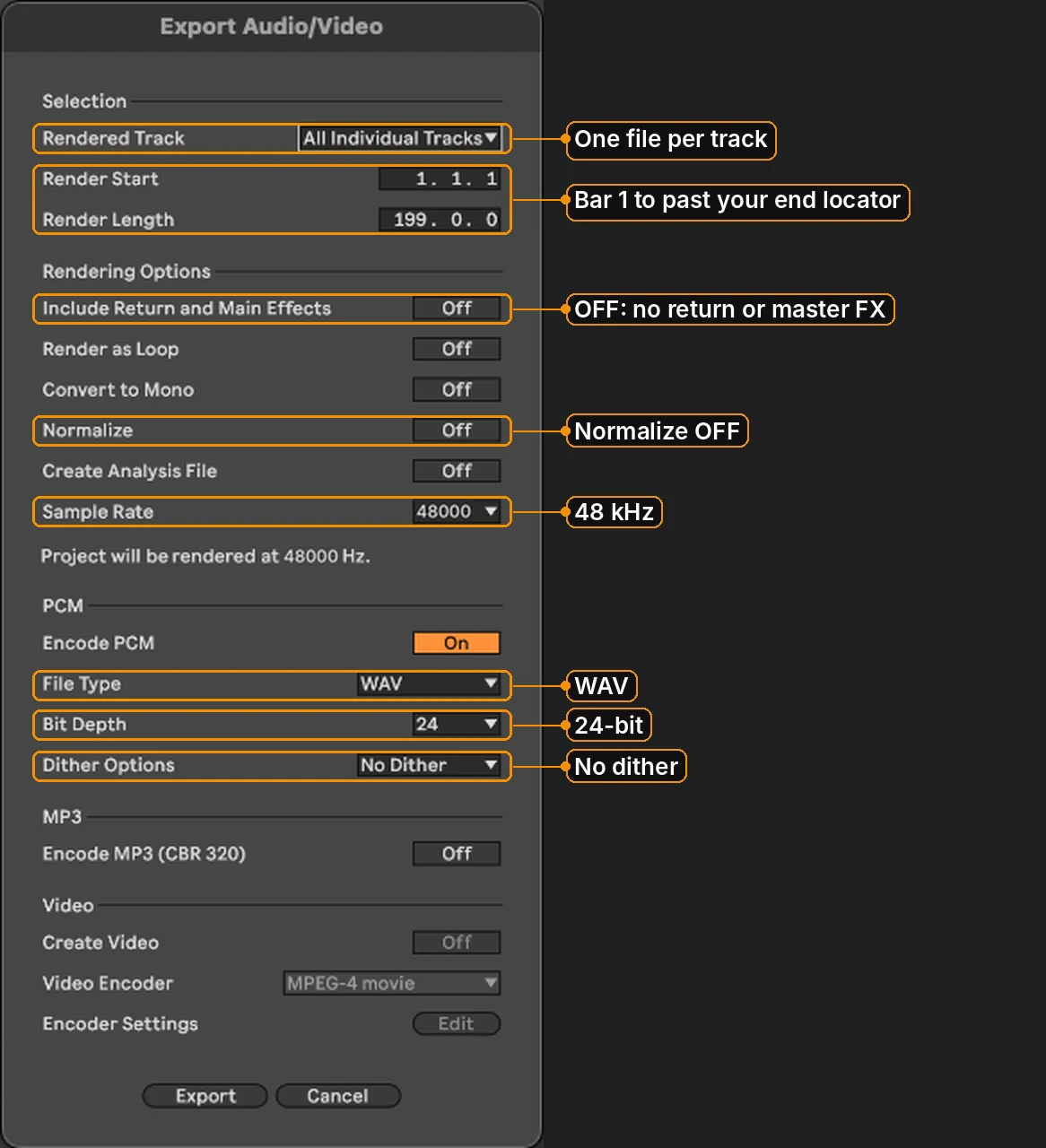
Export as 24-bit WAV, 48 kHz.
How to get there
- Play the loudest part of your track and check the peak readout on your master channel.
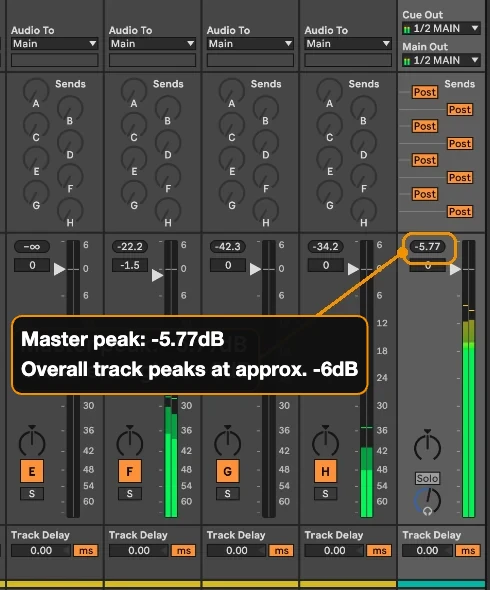
Overall track peaks at approx. -6dB on the master. - If it’s too hot, select all your channels and bring the faders down together (NOT the master fader!). Why? Turning the master down only turns the master down. If you’re exporting stems, they come from your channels, so pulling the master fader down won’t help them.
- Exporting stems? Check none of your channels go over 0dB. Inside your DAW they won’t clip, but they will the moment they’re exported as 24-bit files.[2]
- Switch off everything on the master, then export as 24-bit WAV or AIFF, 48kHz preferred.
What about 32-bit float?
A 32-bit float file can hold peaks above 0dB without baking in distortion. Turn it down afterwards and it’s clean again.[17] It’s a great safety net, but it won’t undo a limiter or a plug-in that has clipped. For mixing and mastering, I still ask for 24-bit WAV or AIFF, 48kHz preferred.
Quick checklist
- Master (or the sum of your stems) peaks at roughly -6dB (close is fine)
- Nothing switched on on the master channel
- No hard clipping anywhere
- 24-bit WAV or AIFF, 48kHz preferred
Coming soon: KTM Green Light – Premaster Monitor
I’m building a free Max for Live device for exactly this. Drop it first on your master, play your track through, and it holds your highest peak and gives you a green light when you’re at -6dB or below. Keep an eye on the site for when it drops. (You’ll need Live Suite, or Live Standard with Max for Live, to run it.)
Exporting stems for a mix? See How to Export Stems for Mixing. Not sure your mix is ready? A Track Check (Pre-Mix Feedback) will tell you.
References
- Dormon, B. (2011) ‘How digital audio ate itself and the music industry’, The Register, 24 November.
- Ableton (n.d.) Live 12 Reference Manual, ch. ‘Mixing’. Berlin: Ableton.
- Bennett, S. (2021) ‘Gain Staging In Logic Pro’, Sound On Sound, November.
- Mellor, D. (2019) ‘Exploring the massive headroom in your DAW’, Audio Masterclass, 29 January.
- European Broadcasting Union (2000) EBU R 68: Alignment level in digital audio production equipment and recorders. Geneva: EBU.
- Sound On Sound (n.d.) ‘Q. What are reference levels in digital audio systems?’, Sound On Sound.
- Perkins, J. (n.d.) ‘6 dB of Headroom for Mastering – Myth Explained’, The Pro Audio Files.
- Analog Devices (2012) MT-229: Quantization Noise – An Expanded Derivation of the Equation SNR = 6.02N + 1.76 dB. Norwood, MA: Analog Devices.
- Nielsen, S.H. and Lund, T. (2000) ‘0dBFS+ Levels in Digital Mastering’, 109th Audio Engineering Society Convention, Los Angeles, Preprint 5251.
- Lund, T. (2006) ‘Stop Counting Samples’, 121st Audio Engineering Society Convention, San Francisco.
- FabFilter (n.d.) ‘When to use a linear phase EQ?’, FabFilter Learn.
- Mellor, D. (2018) ‘The difference between minimum-phase and linear-phase EQ on transient signals such as snare drum’, Audio Masterclass, 7 February.
- Sage Audio (n.d.) ‘What is headroom for mastering?’, Sage Audio.
- Vickers, E. (2010) ‘The Loudness War: Background, Speculation and Recommendations’, 129th Audio Engineering Society Convention, San Francisco.
- Záviška, P., Rajmic, P., Ozerov, A. and Rencker, L. (2021) ‘A Survey and an Extensive Evaluation of Popular Audio Declipping Methods’, IEEE Journal of Selected Topics in Signal Processing, 15(1), pp. 5–24.
- Audio Engineering Society (2018) AES5-2018: Preferred sampling frequencies for applications employing pulse-code modulation. New York: AES.
- Mellor, D. (2022) ‘Put an end to clipping with the 32-bit float WAV file format’, Audio Masterclass, 4 October.